
Engineer’s Aide
pipe network analysis
Features
ENGINEER’S AIDE uses EPCON’s Process Innovator simulation interface to provide hydraulic modeling of pumps, miscellaneous equipment, control valves and flow meters for liquid systems with a common stream. Features of ENGINEER’S AIDE include the following:
Design, Simulate and Analyze to identify root-cause flow and pressure problems in any size system.
Size piping and process equipment such as pumps, heat exchangers, control valves, and flow meters
Includes the AIChE DIPPR® pure component physical property database of over 2000 components.
Patented interface with Smart Fittings™ to automate the entry of fittings and hand valves.
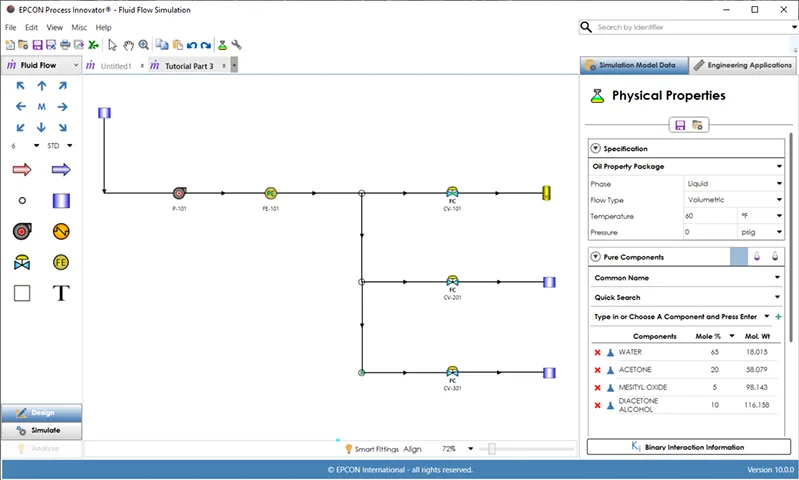
Process Innovator Simulation Interface
Design – Simulate – Analyze
In the Process Innovator GUI, there are 3 steps in modeling – Design, Simulate and Analyze accessed from navigation buttons at the bottom of the Left Hand Panel (LHP). In Design mode, a PFD of a process or utility system is drawn by dragging and dropping equipment and unit operations on the drawing canvas and connecting their ports with pipes or streams. Speed Draw creates a pipe or stream and an equipment or unit operation at the same time in the direction selected.
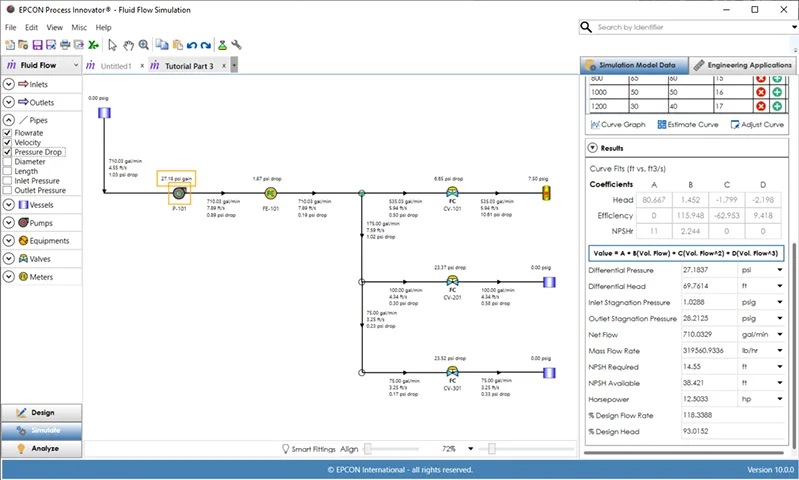
In the Simulate mode, the model results are displayed in a few seconds using EPCON’s advanced simulation engines. The Simulate mode allows for review of input and output results on the drawing canvas as specified on the LHP. Clicking any equipment, unit operation, pipe or stream displays input and output data in the right hand panel (RHP).
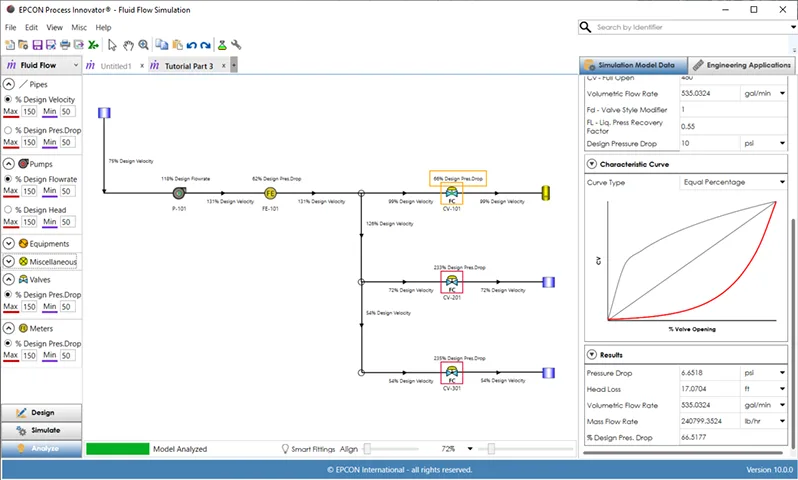
For Fluid Flow Simulation, Analyze provides a detailed diagnostic of what equipment and pipes in the PFD are above or below specified minimum and maximum design specifications. This helps identify the root-cause problems of flow and pressure drop. For Process Flow Simulation, the Analyze mode displays the phase type of each stream which is highlighted by a specific color.
Equipment Sizing Applications
EPCON has been providing applications to size process equipment for over 30 years. The goal for each app is for quick and easy operation. Once you learn how to use one of these engineering apps, all of the others are very easy to load and use. These equipment sizing applications provide the ability to display multiple instances of calculations. Each input and output within a program instance allows for individual customization of units of measure in addition to the global selection of either English or Metric engineering units.
Pipeline Sizing determines the flow rate, pressure drop, or diameter for single phase flows in individual pipes. Load a selected pipe in the Process Innovator interface into this detailed sizing program with a single click. Calculate the pressure drop, flowrate or diameter for either liquid or gas pipes.
Heat Exchanger Sizing sizes Shell and Tube heat exchangers and can be used for any combination of liquid, gas, condensing, or boiling on either the shell or tube side. Accurate sizing can be done without supplying the thermal conductivity or heat transfer coefficient data.
Pump Sizing determines the required pump differential head, hydraulic horsepower, and NPSH available of a pumping system with one suction pipe and one discharge pipe. The suction and discharge pipeline pressure drops are automatically calculated when the diameter and length are entered.
Control Valve Sizing sizes control valves for both gases and liquids. Either the pressure drop, the sizing coefficient, or the flow rate may be determined. The user may evaluate the effects of low versus high recovery valves and determine valve size required to meet a given process demand.
Relief Valve Sizing sizes relief valves for both gas and liquid duty. Based on the ASME pressure vessel codes (section VIII), this program provide a quick and accurate way to evaluate your relief valve needs.
Flow Meter Sizing sizes orifice plates, venturi tubes, and flow nozzles for liquid and gas systems. The methods used are based on the Fluid Meters report published by ASME. The program can solve for pressure drop, orifice diameter, or flow rate.